Operating Systems
A CPU scheduler that can't starve a task, and a Linux filesystem that stores identical data only once.
10Course grade
Deduplicating filesystem
Stores each block once


What it is
A Linux filesystem that stores identical data only once. Files are cut into 4 KB blocks, and a block whose content is already on disk isn’t written again: the file just points to the copy that’s there. It runs in user space through FUSE, built on the Big Brother File System from a FUSE tutorial.
We tested it with a Python suite of 14 tests, and it held up well enough to run a Minecraft server on it, until the game’s multithreaded world generation became the limit.
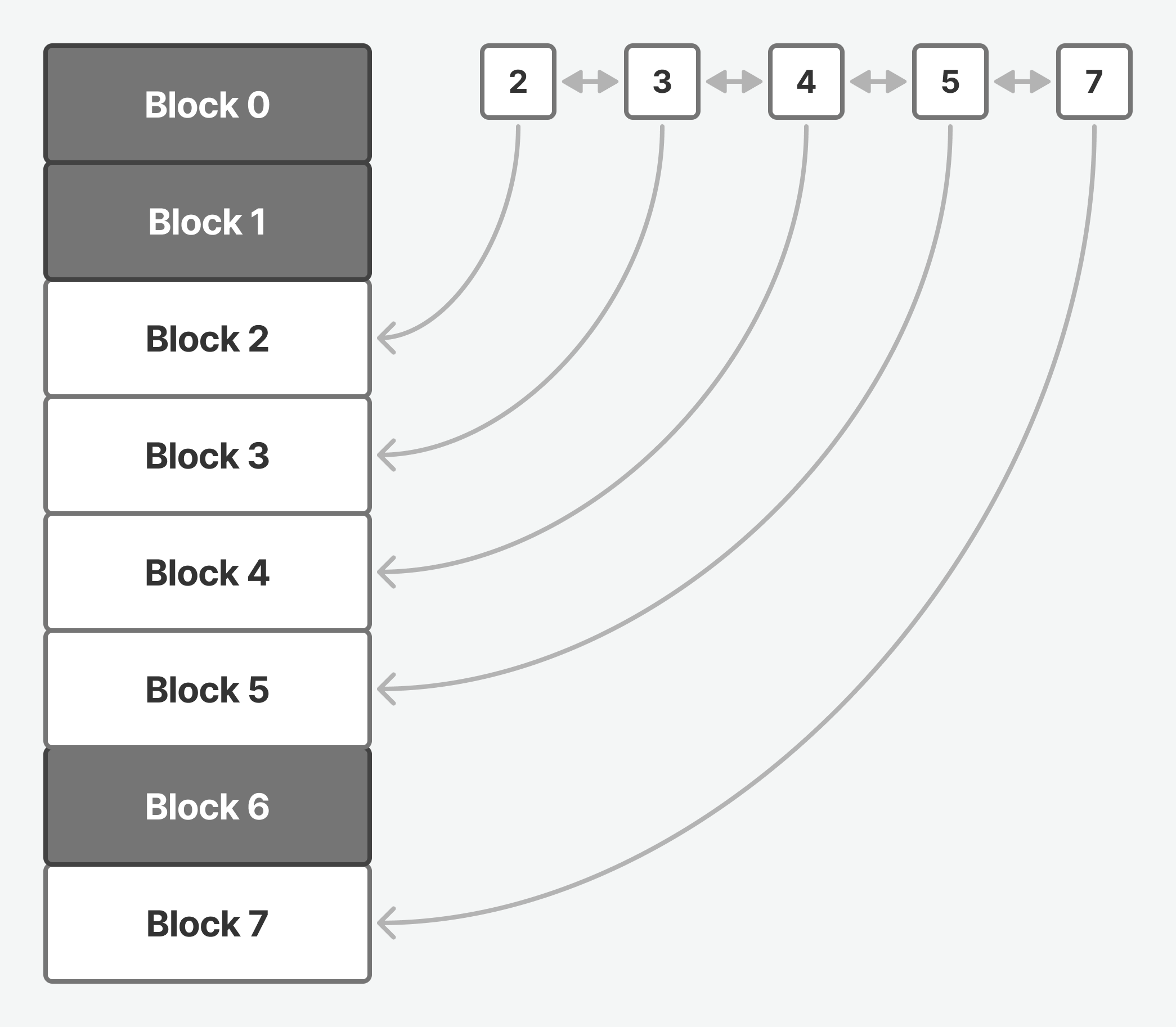
Each block stored once
Every block is identified by its SHA-1 hash. A table maps each hash to where the block sits on disk and how many files use it. Writing a block either adds a reference to one that exists or stores it as new. A file on disk is then only a list of hashes plus the size of its last block, which is all it takes to rebuild it.
With 4-byte block numbers, it holds up to 2³² unique blocks: 16 TB of unique data.
Deleting safely
A block can’t be thrown away when one file is deleted, because another may still use it. Its reference count goes down, and the block is freed only at zero.
Freed blocks go on a sorted list, and new blocks fill those gaps first. When more than 10% of the store is gaps, blocks from the end move into them until it is under 10% again. That keeps the store compact, but it tends to hover around the limit.
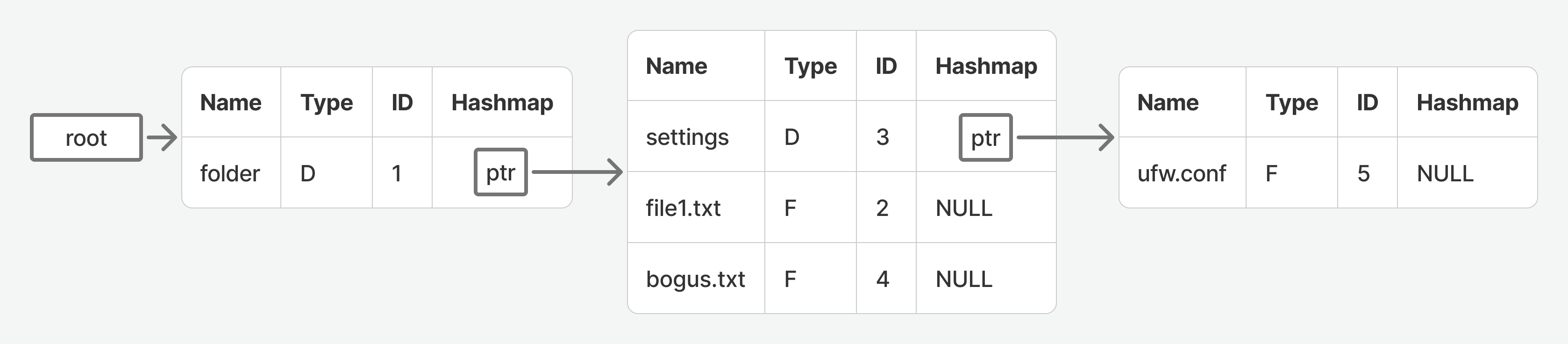
Folders
Each folder keeps its own table of the names, types and IDs inside it, linked into a tree. The tree is read into memory when the filesystem mounts and written back when it unmounts. Each entry takes 273 bytes, so the Linux kernel’s source, about 89,000 files and folders, would need about 23 MB of it.
Code
int remove_reference_from_block(const unsigned char hash[HASH_SIZE])
{
    blocks_hash_element_t *element = blocks_table_find(blocks_metadata, hash);
    if (element == NULL)
        return BLOCK_NOT_FOUND;

    if (element->ref_count == 0)
        return ERROR;

    element->ref_count--;
    if (element->ref_count == 0)
        remove_block(hash);

    return BLOCK_FOUND;
}CPU scheduler
SJF without starvation
What it is
A CPU scheduler decides which waiting task runs next. We wrote two for a scheduling simulator: Shortest Job First, and a version of it that can’t starve a task, then ran both on the same mixes of interactive and number-crunching tasks and drew what each one did.
Shortest Job First
Shortest Job First always runs the task it expects to finish its turn soonest. It can’t know that ahead of time, so it predicts each task’s next burst from its last one and its last prediction.
That keeps short, interactive tasks quick, but a long task can wait forever. With 25 interactive tasks and one long computation, the computation stopped getting the CPU at all: its predicted burst stayed the longest, so it was never picked. In our runs it began to starve at about 20 interactive tasks.
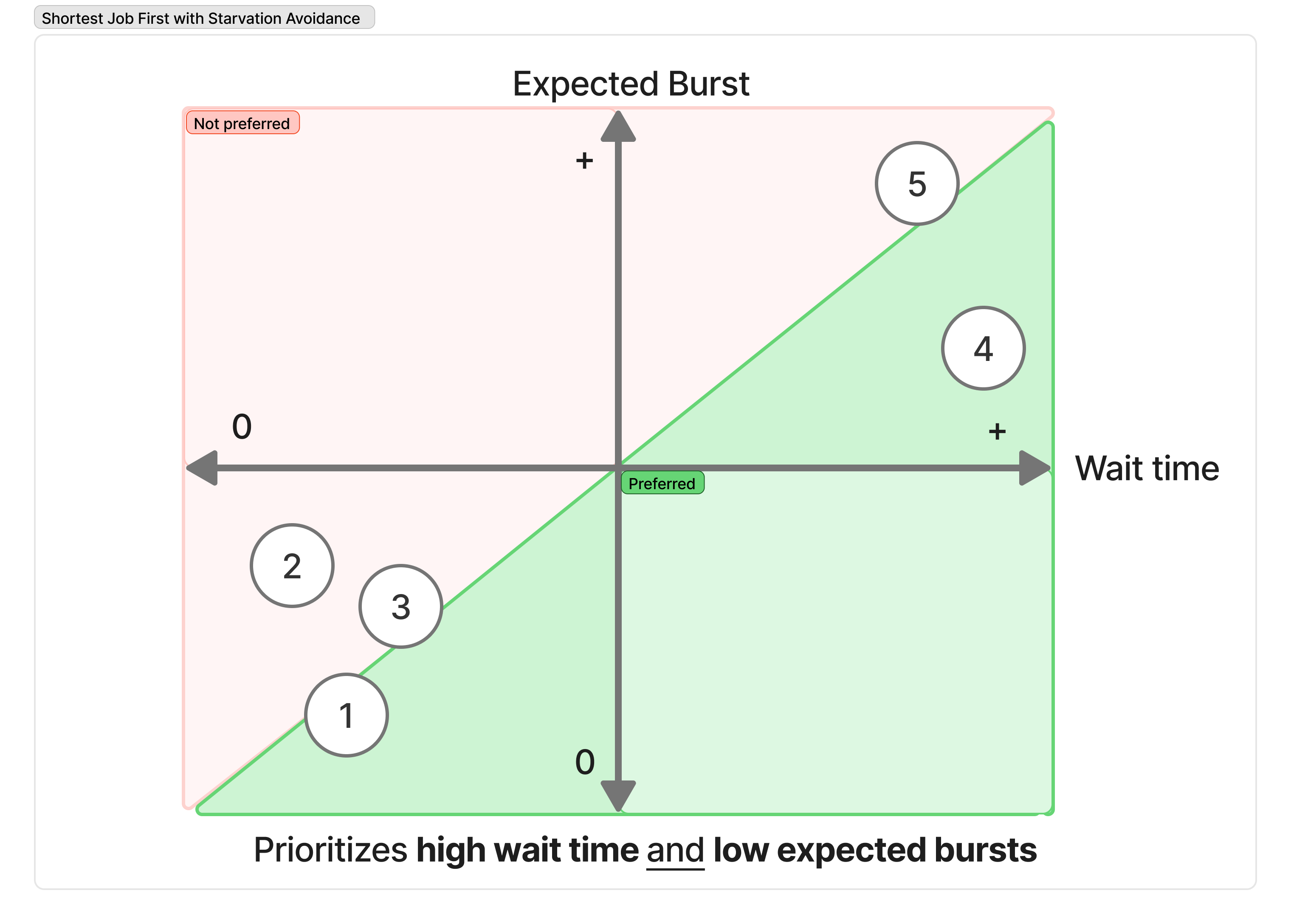
Adding the wait
Our version scores every task by two things with equal weight: its predicted burst, compared with the shortest in the queue, and how long it has waited, compared with the longest wait. It runs the task with the best score, so a task that has waited long enough gets the CPU even if its burst is long.
What we saw
On the same 25-and-1 mix the computation kept running. With five tasks of each kind, plain Shortest Job First ran the long tasks only when no interactive task needed the CPU; ours gave every task its turn. With only long tasks, both behaved like round robin, taking turns.
The fairness has a cost: more work on every scheduling decision, and sometimes a long task runs ahead of an interactive one. With few interactive tasks plain Shortest Job First is the better choice; with many, ours keeps the long tasks moving.
Code
#define CALCULATE_EXPECTED_BURST(prev_actual_burst, prev_expected_burst) \
(((prev_actual_burst) + (ALPHA) * (prev_expected_burst)) / (1 + (ALPHA)))

#define CALCULATE_GOODNESS(expected_burst, min_expected_burst, max_waiting_in_rq, waiting_in_rq) \
((1 + expected_burst) / (1 + min_expected_burst)) * ((1 + max_waiting_in_rq) / (1 + waiting_in_rq))Tools
What this course's projects were built with. Pick one to see where else I used it.